VMware powershell linux et cloud-init
Déployer une VM Linux sur VMware avec paramétrage par cloud-init
Un sacré morceau présenté ici, mis au point par mon collègue Jonathan. 2 parties intéressantes à voir, avec dans un premier temps toute la partie description de la machine à déployer en json. L'autre partie concerne le paramétrage de ou des VM qui utilise cloud-init pour la configuration réseau, la création du ou des comptes locaux ou encore les packages à déployer. L'infra VMware utilisée est ici en V8, elle ne propose pas encore d'interface qui permette de simplement injecter les paramètres. La documentation a été compliqué à trouver. Sur ce sujet on peut consulter
- la documentation officielle de cloud-init sur https://cloudinit.readthedocs.io/en/latest/
- l'entrée Guest Customization Using cloud-init de Broadcom
- ou encore Search cancel Search How to customize virtual machine using Cloud-init metadata and user data in vSphere 7.0 Update 3
Comme dit, la description du ou des machines à déployer se fait dans un fichier json. En voici un exemple qu'il vous faudra adapter suivant votre infra
{
  "vcenter": {
    "server": "nomvcenter.localdomain.com",
    "username": "administrator@vsphere.local",
    "password": "lemotdepasseenclair"
  },
  "global": {
    "contentLibrary": "LibraryName",
    "ovaTemplate": "Ubuntu-Server-LTS",
    "cluster": "NomCluster",
    "delayBetweenDeployments": 60
  },
  "vms": [
    {
      "name": "VMNAME01",
      "hostname": "VMNAME01",
      "fqdn": "VMNAME01.yourdomain.local",
      "datastore": "DatastoreName",
      "folder": "Vmware folder name",
      "portGroup": "portGroupName",
      "cpuCount": 2,
      "memoryGB": 4,
      "osDiskGB": 80,
      "networkType": "static",
      "ipAddress": "192.168.0.10",
      "subnetMask": "24",
      "gateway": "192.168.0.1",
      "dnsServers": ["10.0.0.1", "10.0.0.2"],
      "adminUser": "localaccount",
      "adminPasswordHash": "zjflm7zk9d3rb19kzl2424x5nak1bn7b2yrowo411gqkfqyqs9ll1wt8k1kdbgi3du9rtwt8q4vujp3r1rri8k5zbi4smn9b9jz3m5cd1qao2y4waws08das69t4s663",
      "sshKeys": ["ssh-ed25519 AAAACyHJvZF07D9cbZbT1OTxPXRxOlxDhh0WKeW13oceuQ6IjesuZPC9EpJgYltkhgAW accountname@SERVERNAME"],
      "cisLevel1": true,
      "packages": [
        "btop",
        "iotop"
      ],
      "additionalDisks": [
        {
          "sizeGB": 50,
          "devicePath": "/dev/sdb",
          "useLVM": true,
          "volumeGroup": "vg_web",
          "logicalVolumes": [
            {
              "name": "lv_www",
              "size": "30G",
              "mountPoint": "/var/www",
              "filesystem": "ext4"
            },
            {
              "name": "lv_logs",
              "size": "20G",
              "mountPoint": "/var/log/nginx",
              "filesystem": "ext4"
            }
          ]
        }
      ],
      "runCommands": [
        "apt update && apt upgrade -y",
        "ip -a"
      ]
    }
  ]
}
Quand vous examinerez ce fichier json vous verrez qu'il est demander de renseigner la propriété contentLibrary.
Dans votre interface VMware cela correspond à ceci
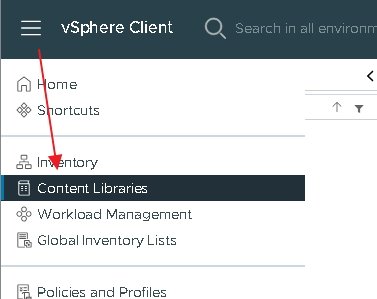
Dedans vous devrez y uploader votre distribution Linux au format OVA.
Par exemple pour Ubuntu on peut trouver cet OVA sur https://cloud-images.ubuntu.com/noble/current/
Quand vous allez uploader l'OVA sur votre infra VMware vous devrez lui donner un nom, c'est ce nom que vous devez reporter dans la propriété contentLibrary.
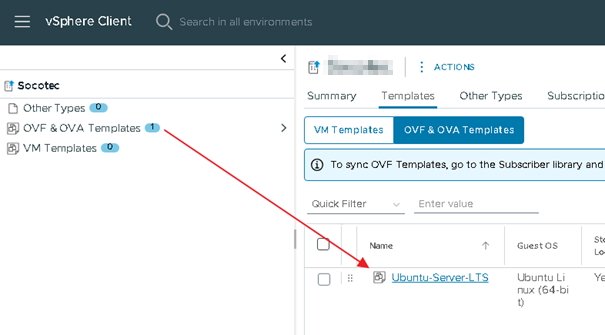
Dans le fichier json vous devrez aussi indiquer le hash en SHA512 du mot de passe de vos comptes dans la propriété adminPasswordHash.
On peut l’obtenir en faisant
openssl passwd -6 lemotdepasseEn l'état le fichier json comporte la déclaration d'un disque supplémentaire. Vous pouvez le supprimer ou en ajouter d'autres.
Dans le script powershell donné après, il est intéressant de voir que la partie cloud-init est renseignée en utilisant 3 propriétés :
- guestinfo.userdata
- guestinfo.metadata
- guestinfo.network-config
Les données à insérer dans ces propriétés doivent être au format YAML codées en base64. Dans le script c'est la fonction Build-CloudInit() qui se charge de convertir certaines données json au bon format.
Pour procéder au déploiement de vos VM, vous devez adapter la commande suivante
.\LeScriptPowerShell.ps1 -ConfigFile ".\Votre-config.json"Voici le code powershell du script qui interprète le fichier json pour déployer vos VM
param(
    [Parameter(Mandatory=$true)]
    [string]$ConfigFile
)

$ErrorActionPreference = "Stop"

# ============================================================================
# FUNCTIONS
# ============================================================================

function Convert-ToHashtable {
    param($Object)
    if ($null -eq $Object) { return $null }
    if ($Object -is [hashtable]) { return $Object }
    if ($Object -is [System.Collections.IEnumerable] -and $Object -isnot [string]) {
        return @(foreach ($item in $Object) { Convert-ToHashtable $item })
    }
    if ($Object -is [PSCustomObject]) {
        $hash = @{}
        foreach ($prop in $Object.PSObject.Properties) {
            $hash[$prop.Name] = Convert-ToHashtable $prop.Value
        }
        return $hash
    }
    return $Object
}

function Build-CloudInit {
    param($VM)

    # User-data with datasource configuration
    $userData = "#cloud-config`n"
    $userData += "hostname: $($VM.hostname)`n"
    $userData += "fqdn: $($VM.fqdn)`n"
    $userData += "manage_etc_hosts: true`n"

    # CRITICAL: Ensure VMware datasource is used
    $userData += "`ndatasource:`n"
    $userData += "  VMware:`n"
    $userData += "    allow_raw_data: true`n"
    $userData += "`ndatasource_list: [ VMware, OVF, None ]`n`n"

    # User account for admin access
    $userData += "users:`n"
    $userData += "  - name: $($VM.adminUser)`n"
    $userData += "    sudo: ALL=(ALL) NOPASSWD:ALL`n"
    $userData += "    groups: sudo`n"
    $userData += "    shell: /bin/bash`n"
    $userData += "    lock_passwd: false`n"
    $userData += "    passwd: $($VM.adminPasswordHash)`n"

    # SSH keys
    if ($VM.adminsshKeys) {
        $userData += "    ssh_authorized_keys:`n"
        foreach ($key in $VM.adminsshKeys) {
            $userData += "      - $key`n"
        }
    }

    # User account for Ansible (separate from admin user)
    $userData += "  - name: $($VM.ansibleUser)`n"
    $userData += "    sudo: ALL=(ALL) NOPASSWD:ALL`n"
    $userData += "    groups: sudo`n"
    $userData += "    shell: /bin/bash`n"
    $userData += "    lock_passwd: false`n"
    $userData += "    passwd: $($VM.ansiblePasswordHash)`n"

    # SSH keys
    if ($VM.ansibleSshKeys) {
        $userData += "    ssh_authorized_keys:`n"
        foreach ($key in $VM.ansibleSshKeys) {
            $userData += "      - $key`n"
        }
    }
    # Packages
    $userData += "`npackage_update: true`n"
    $userData += "package_upgrade: true`n"
    if ($VM.packages) {
        $userData += "`npackages:`n"
        foreach ($pkg in $VM.packages) {
            $userData += "  - $pkg`n"
        }
    }

    # Commands
    $commands = @()

    # LVM setup
    if ($VM.additionalDisks) {
        foreach ($disk in $VM.additionalDisks) {
            if ($disk.useLVM) {
                $vg = $disk.volumeGroup
                $dev = $disk.devicePath
                $commands += "while [ ! -e $dev ]; do sleep 1; done"
                $commands += "pvcreate $dev"
                $commands += "vgcreate $vg $dev"
                foreach ($lv in $disk.logicalVolumes) {
                    $lvpath = "/dev/$vg/$($lv.name)"
                    $commands += "lvcreate -L $($lv.size) -n $($lv.name) $vg"
                    $commands += "mkfs.$($lv.filesystem) $lvpath"
                    $commands += "mkdir -p $($lv.mountPoint)"
                    $commands += "echo '$lvpath $($lv.mountPoint) $($lv.filesystem) defaults 0 0' >> /etc/fstab"
                    $commands += "mount $($lv.mountPoint)"
                }
            }
        }
    }

    # CIS hardening
    if ($VM.cisLevel1) {
        $cisPath = Join-Path $PSScriptRoot "cis-level1-hardening.sh"
        if (Test-Path $cisPath) {
            $cisContent = Get-Content $cisPath -Raw
            $cisB64 = [Convert]::ToBase64String([Text.Encoding]::UTF8.GetBytes($cisContent))
            $userData += "`nwrite_files:`n"
            $userData += "  - encoding: b64`n"
            $userData += "    content: $cisB64`n"
            $userData += "    path: /tmp/cis.sh`n"
            $userData += "    permissions: '0755'`n"
            $commands += "/tmp/cis.sh"
        }
    }

    # User commands
    if ($VM.runCommands) {
        $commands += $VM.runCommands
    }

    # Add all commands
    if ($commands.Count -gt 0) {
        $userData += "`nruncmd:`n"
        foreach ($cmd in $commands) {
            $userData += "  - $cmd`n"
        }
    }

    # Metadata with network configuration embedded
    $metadata = "instance-id: $($VM.name)`n"
    $metadata += "local-hostname: $($VM.hostname)`n"
    $metadata += "network:`n"
    $metadata += "  version: 2`n"
    $metadata += "  ethernets:`n"
    $metadata += "    id0:`n"
    $metadata += "      match:`n"
    $metadata += "        name: en*`n"
    if ($VM.networkType -eq "static") {
        $metadata += "      addresses: [$($VM.ipAddress)/$($VM.subnetMask)]`n"
        $metadata += "      routes:`n"
        $metadata += "        - to: default`n"
        $metadata += "          via: $($VM.gateway)`n"
        $metadata += "      nameservers:`n"
        $metadata += "        addresses: [$($VM.dnsServers -join ', ')]`n"
    } else {
        $metadata += "      dhcp4: true`n"
    }

    # Separate network config for guestinfo.network-config (keep both for compatibility)
    $network = "version: 2`n"
    $network += "ethernets:`n"
    $network += "  id0:`n"
    $network += "    match:`n"
    $network += "      name: en*`n"
    if ($VM.networkType -eq "static") {
        $network += "    addresses: [$($VM.ipAddress)/$($VM.subnetMask)]`n"
        $network += "    routes:`n"
        $network += "      - to: default`n"
        $network += "        via: $($VM.gateway)`n"
        $network += "    nameservers:`n"
        $network += "      addresses: [$($VM.dnsServers -join ', ')]`n"
    } else {
        $network += "    dhcp4: true`n"
    }

    return @{
        UserData = $userData
        Metadata = $metadata
        Network = $network
    }
}

function Deploy-SingleVM {
    param($VM, $Global)

    Write-Host "`n========================================" -ForegroundColor Cyan
    Write-Host "Deploying: $($VM.name)" -ForegroundColor Cyan
    Write-Host "========================================" -ForegroundColor Cyan

    try {
        # Check existing
        if (Get-VM -Name $VM.name -ErrorAction SilentlyContinue) {
            Write-Host "ERROR: VM already exists" -ForegroundColor Red
            return $false
        }

        # Get resources
        Write-Host "Getting vCenter resources..." -ForegroundColor Gray
        $cluster = Get-Cluster -Name $Global.cluster
        $datastore = Get-Datastore -Name $VM.datastore
        $contentLib = Get-ContentLibrary -Name $Global.contentLibrary
        $template = Get-ContentLibraryItem -ContentLibrary $contentLib -Name $Global.ovaTemplate
        $resPool = Get-ResourcePool -Location $cluster -Name "Resources"
        $folder = Get-Folder -Name $VM.folder -ErrorAction SilentlyContinue

        # Deploy VM
        Write-Host "Deploying from Content Library..." -ForegroundColor Yellow
        $newVM = New-VM -Name $VM.name `
            -ContentLibraryItem $template `
            -ResourcePool $resPool `
            -Datastore $datastore `
            -Location $folder

        Write-Host "✓ VM created" -ForegroundColor Green

        # Configure hardware
        Write-Host "Configuring hardware..." -ForegroundColor Yellow
        Set-VM -VM $newVM -NumCpu $VM.cpuCount -MemoryGB $VM.memoryGB -Confirm:$false | Out-Null

        # Resize disk
        if ($VM.osDiskGB) {
            $disk = Get-HardDisk -VM $newVM | Select-Object -First 1
            if ($disk.CapacityGB -lt $VM.osDiskGB) {
                Set-HardDisk -HardDisk $disk -CapacityGB $VM.osDiskGB -Confirm:$false | Out-Null
            }
        }

        # Network
        $nic = Get-NetworkAdapter -VM $newVM
        Set-NetworkAdapter -NetworkAdapter $nic -NetworkName $VM.portGroup -StartConnected:$true -Confirm:$false | Out-Null

        # Additional disks
        if ($VM.additionalDisks) {
            foreach ($disk in $VM.additionalDisks) {
                New-HardDisk -VM $newVM -CapacityGB $disk.sizeGB -StorageFormat Thin -Datastore $datastore | Out-Null
            }
        }

        Write-Host "✓ Hardware configured" -ForegroundColor Green

        # Cloud-init
        Write-Host "Setting up cloud-init..." -ForegroundColor Yellow
        $ci = Build-CloudInit -VM $VM

        # CRITICAL: Always set network-config (for both DHCP and static)
        # This overrides the template's default network configuration
        $settings = @{
            "guestinfo.userdata" = [Convert]::ToBase64String([Text.Encoding]::UTF8.GetBytes($ci.UserData))
            "guestinfo.userdata.encoding" = "base64"
            "guestinfo.metadata" = [Convert]::ToBase64String([Text.Encoding]::UTF8.GetBytes($ci.Metadata))
            "guestinfo.metadata.encoding" = "base64"
            "guestinfo.network-config" = [Convert]::ToBase64String([Text.Encoding]::UTF8.GetBytes($ci.Network))
            "guestinfo.network-config.encoding" = "base64"
            "disk.EnableUUID" = "TRUE"
        }

        foreach ($key in $settings.Keys) {
            $adv = Get-AdvancedSetting -Entity $newVM -Name $key -ErrorAction SilentlyContinue
            if ($adv) {
                Set-AdvancedSetting -AdvancedSetting $adv -Value $settings[$key] -Confirm:$false | Out-Null
            } else {
                New-AdvancedSetting -Entity $newVM -Name $key -Value $settings[$key] -Confirm:$false | Out-Null
            }
        }

        # CRITICAL: Enable VMware customization
        Write-Host "Ebling VMware customization..." -ForegroundColor Gray
        $spec = New-Object VMware.Vim.VirtualMachineConfigSpec
        $spec.Tools = New-Object VMware.Vim.ToolsConfigInfo
        $spec.Tools.SyncTimeWithHost = $false

        # Create custom attributes for cloud-init
        $extraConfig = @()

        $opt = New-Object VMware.Vim.OptionValue
        $opt.Key = "guestinfo.disable_vmware_customization"
        $opt.Value = "false"
        $extraConfig += $opt

        $spec.ExtraConfig = $extraConfig

        $newVM.ExtensionData.ReconfigVM($spec)

        Write-Host "✓ Cloud-init configured" -ForegroundColor Green
        Write-Host "  Network: $($VM.networkType)" -ForegroundColor Gray
        if ($VM.networkType -eq "static") {
            Write-Host "  IP: $($VM.ipAddress)/$($VM.subnetMask)" -ForegroundColor Gray
            Write-Host "  Gateway: $($VM.gateway)" -ForegroundColor Gray
            Write-Host "  DNS: $($VM.dnsServers -join ', ')" -ForegroundColor Gray
        }

        # Power on
        Write-Host "Powering on VM..." -ForegroundColor Yellow
        Start-VM -VM $newVM -Confirm:$false | Out-Null

        Write-Host "`n✓✓✓ SUCCESS ✓✓✓" -ForegroundColor Green
        Write-Host "VM: $($VM.name)" -ForegroundColor White
        if ($VM.networkType -eq "static") {
            Write-Host "IP: $($VM.ipAddress)" -ForegroundColor White
        } else {
            Write-Host "Network: DHCP" -ForegroundColor White
        }
        Write-Host "Cloud-init will complete in 2-5 minutes" -ForegroundColor Yellow

        return $true
    }
    catch {
        Write-Host "`n✗✗✗ FAILED ✗✗✗" -ForegroundColor Red
        Write-Host "Error: $_" -ForegroundColor Red
        return $false
    }
}

# ============================================================================
# MAIN
# ============================================================================

Write-Host "`n╔══════════════════════════════════════╗" -ForegroundColor Cyan
Write-Host "║   Ubuntu VM Deployment Script       ║" -ForegroundColor Cyan
Write-Host "╚══════════════════════════════════════╝" -ForegroundColor Cyan

# Load config
Write-Host "`nLoading configuration..." -ForegroundColor Gray
if (!(Test-Path $ConfigFile)) {
    Write-Host "ERROR: Config file not found: $ConfigFile" -ForegroundColor Red
    exit 1
}

$json = Get-Content $ConfigFile -Raw | ConvertFrom-Json
$config = Convert-ToHashtable $json

# Validate
if (!$config.global.contentLibrary) {
    Write-Host "ERROR: Missing contentLibrary in config" -ForegroundColor Red
    Write-Host "Add: `"contentLibrary`": `"YourLibraryName`"" -ForegroundColor Yellow
    exit 1
}

if (!$config.global.ovaTemplate) {
    Write-Host "ERROR: Missing ovaTemplate in config" -ForegroundColor Red
    Write-Host "Add: `"ovaTemplate`": `"noble-server-cloudimg-amd64`"" -ForegroundColor Yellow
    exit 1
}

Write-Host "✓ Config loaded" -ForegroundColor Green
Write-Host "  Content Library: $($config.global.contentLibrary)" -ForegroundColor White
Write-Host "  Template: $($config.global.ovaTemplate)" -ForegroundColor White
Write-Host "  VMs: $($config.vms.Count)" -ForegroundColor White

# Load PowerCLI
if (!(Get-Module VMware.VimAutomation.Core -ErrorAction SilentlyContinue)) {
    Write-Host "`nLoading PowerCLI..." -ForegroundColor Gray
    Import-Module VMware.VimAutomation.Core -ErrorAction Stop
}

# Connect
Write-Host "`nConnecting to vCenter..." -ForegroundColor Gray
$pass = ConvertTo-SecureString $config.vcenter.password -AsPlainText -Force
$cred = New-Object PSCredential($config.vcenter.username, $pass)
Connect-VIServer -Server $config.vcenter.server -Credential $cred | Out-Null
Write-Host "✓ Connected to $($config.vcenter.server)" -ForegroundColor Green

# Deploy
$success = 0
$failed = 0

foreach ($vm in $config.vms) {
    if (Deploy-SingleVM -VM $vm -Global $config.global) {
        $success++
    } else {
        $failed++
    }

    if ($config.global.delayBetweenDeployments -gt 0) {
        Write-Host "`nWaiting $($config.global.delayBetweenDeployments)s..." -ForegroundColor Gray
        Start-Sleep -Seconds $config.global.delayBetweenDeployments
    }
}

# Summary
Write-Host "`n`n╔══════════════════════════════════════╗" -ForegroundColor Cyan
Write-Host "║         SUMMARY                      ║" -ForegroundColor Cyan
Write-Host "╚══════════════════════════════════════╝" -ForegroundColor Cyan
Write-Host "Total:      $($config.vms.Count)" -ForegroundColor White
Write-Host "Success:    $success" -ForegroundColor Green
Write-Host "Failed:     $failed" -ForegroundColor $(if($failed -gt 0){"Red"}else{"Green"})

Disconnect-VIServer -Confirm:$false

Write-Host "`n✓ Done!`n" -ForegroundColor GreenArticle(s) en relation(s)